Drafted for review. Last source review: 11 October 2026. No affiliate links are used in this article.
A trade-software demo can be impressive and still tell you very little. A presenter moves quickly through a clean account, every customer is cooperative, every job has already been set up and every screen looks calm. You leave thinking the software is easy. Later, a real customer changes the date, an operative needs a photo from the van and the invoice has to match the quote. The parts that matter were never tested.
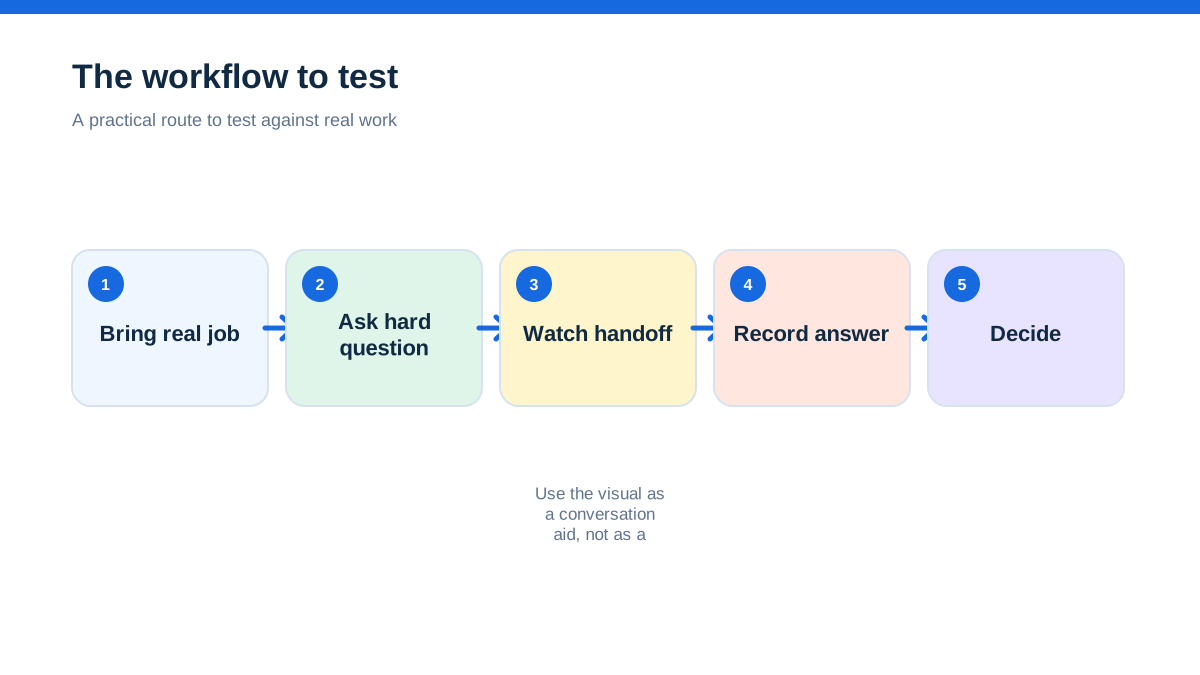
A useful demo is not a guided tour. It is a controlled rehearsal of the work your business already does. You bring a real workflow, use safe sample data and ask the supplier to show what happens when the normal case becomes awkward. The aim is not to catch the presenter out. The aim is to find out whether the product supports your way of working without hiding the handovers that create admin.
This guide is for sole traders, office-based coordinators and small trade teams comparing job-management, quoting, scheduling, invoicing and customer-communication software. It also covers accounting and tax-related questions, but it does not replace advice from an accountant. HMRC’s guidance says businesses choosing software for Making Tax Digital for Income Tax should check that it can create digital records, send the required updates and submit the tax return where applicable.[4][5]
The aha: A demo is most valuable when you stop asking whether a feature exists and ask what a tired person has to do when a job changes at 4.30 pm.
The demo where everyone nodded
Picture a small electrical contractor comparing two systems. The owner wants fewer missed details. The administrator wants less copying between the diary and the invoice. The engineer wants to see the job on a phone without searching through a long conversation. During the demo, each person hears a familiar feature name: scheduling, mobile app, templates, payment links and reporting. Everyone nods.

The supplier finishes with a neat dashboard. The team says it looks good. No one has seen the exact path from a customer enquiry to a quote, a booked visit, a changed appointment, a site photo and an invoice. They have assessed the software’s presentation, not the software’s fit.
A better approach starts with one ordinary job and one awkward variation. Choose a job type that occurs often enough to matter but contains the detail your current process loses. It might be a boiler repair requiring access instructions, an electrical inspection that produces a certificate, a bathroom project with staged work or a maintenance visit that leads to a follow-up quote.
Do not use private customer information in the demo. Replace names, addresses, phone numbers and photographs with safe examples. The point is to copy the shape of the work, not to expose the customer record.
The paper on the dashboard became the test card
Before booking a demo, write a one-page test card. Use plain language rather than feature names. A test card might say:
- A new customer calls about a repair.
- The business records the address, access note and preferred contact channel.
- A quote is sent and accepted.
- The job is booked for an arrival window.
- The customer asks to move the visit.
- The operative adds a photo and a note from the site.
- Extra work is agreed and needs approval.
- The invoice must reflect what was done.
- The office needs to see what is outstanding.
Add a second column called “what good looks like”. For example, “The customer’s access note is visible to the person attending, but internal comments are not accidentally included in customer-facing text.” That sentence gives you something to observe without assuming how the supplier must build the feature.
Then add a third column called “what could go wrong”. The appointment might move after a reminder has been sent. The customer might reply to the wrong address. The operative might have poor connectivity. The quote might be accepted with an alteration. A payment might be received before the office has reconciled the account.
The test card is a practical guard against demo drift. If the presenter jumps to a report that you did not request, bring the conversation back to the next line on the card. You are allowed to ask for a recorded answer later, but mark the item as untested rather than treating a promise as evidence.
The first screen should be the customer’s problem
Start the demo with the enquiry, not the dashboard. Ask the presenter to create a new customer and job using your test card. Watch which information is mandatory, which fields are optional and which details are hidden in notes. If the system asks for a large amount of information before a job can exist, ask whether there is a quicker route for an urgent call-out.
Look for language your team will actually use. “Job status”, “appointment”, “task”, “quote” and “invoice” may be obvious to the supplier but not to every person in your business. Ask what the customer sees and what the team sees. A good system can have a sophisticated internal model while still giving the user a simple next action.
Ask how duplicates are detected. Trade businesses often receive calls from the same household, landlord or property manager. A duplicate customer record can split the history of work, which makes future quoting and fault finding harder. You do not need the software to solve every data-cleaning problem, but you need to know how it exposes one.
The aim of this part is not to score screen design. It is to discover whether the system creates a reliable record from the first contact. If the first record is incomplete, every later report may look tidy while describing the wrong job.
The quote looked fine until the customer changed it
Ask the presenter to build a quote with the kind of labour, materials and optional work your business actually sells. Then change one line. Ask what happens when the customer accepts only part of the quote or asks a question before accepting. Find out where the conversation is stored and whether a revised version is clearly separated from the earlier one.
A useful demo should show the boundary between a quote and a job. Some businesses want an accepted quote to create a job automatically. Others need an office check before work is booked. Neither pattern is universal. The question is whether the software supports the control you need without forcing people into duplicate entry.
Ask how prices, VAT treatment, discounts and terms are represented in the document. Avoid being distracted by a polished PDF. Read the document as a customer would. Is the scope clear? Can the customer tell what is included and excluded? Is the acceptance action obvious? If a trade needs a deposit, staged payment or variation approval, ask the presenter to show it rather than describing it.
This is also where you can spot hidden work. A quote may be quick to create but slow to correct. A template may look professional but require a manager to edit every exception. Record the number of decisions a normal user has to make, not only the number of fields available.
The calendar became a conversation about change
Now book the job. Use a realistic arrival window and assign it to the person who would normally attend. Ask what the operative sees, what the customer receives and whether the diary prevents a double booking. Then move the visit. This is the moment when a demo becomes useful.
Ask four questions:
- Is the original appointment history retained?
- Does the customer receive a new confirmation, and is the old one cancelled or explained?
- Does the assigned person see the change immediately?
- Who owns the customer reply if the new time does not work?
Do not accept “the calendar syncs” as a complete answer. You need to know what synchronises, in which direction, with what delay and with what conflict behaviour. If the product connects to an external calendar, ask whether an edit there changes the job or only changes a personal view.
Create an exception in the test card. Tell the presenter the customer cannot provide access on the original day. Watch whether the system encourages a new booking, a note, a task or a conversation. A product may offer all four. Your team needs to know which one is the official record.
The result you want is not a perfect diary. It is a visible chain of decisions. When an appointment changes, a person should be able to tell what was agreed without reading every message ever sent.
The phone in the van revealed the real product
A desktop screen can hide the work done away from the office. Ask the presenter to switch to the mobile experience and use the same job. You should see the address, scope, access notes, contact details, schedule and relevant history without needing to reconstruct the job from separate places.
Ask what happens when the operative adds a photo, writes a note, records time or asks for approval. Does the information appear on the office view? Can it be edited later? Is there a clear distinction between a private note and a customer-facing update? Does the app require a stable connection for ordinary tasks, and what is the expected behaviour when the connection is poor?
Do not turn this into a laboratory claim about coverage. You are checking the workflow in the places your people actually work. If the team uses personal phones, ask about supported devices and permission settings. If the business supplies phones, ask how accounts are removed when someone leaves.
Give the mobile screen to the person who will use it. A manager who understands the product can navigate a demo account. The person who needs to update a job between visits may choose a different route. Let the real user describe what they would tap first, what they would ignore and what they would need to find quickly.
The extra item exposed the approval rule
Most jobs contain a moment when the planned work changes. A damaged fitting needs replacing, a customer asks for an additional socket or a survey uncovers a second issue. Ask the presenter to add an extra item and request approval from the customer.
You are testing more than an add-on feature. You are testing authority, evidence and billing. Who can create the variation? Who can approve it? Is approval recorded with the job? Can the office see whether the work is authorised? Does the invoice distinguish the original scope from the extra work?
A useful system should make the business rule visible. If operatives can add anything without a check, margins and customer expectations may drift. If nothing can be changed without returning to the office, field work may slow down. The correct balance depends on the business. Ask for the configuration, not the marketing description.
Also ask what happens if the customer says no. The system should not force a binary path in which declined work disappears. You may need a note, a separate quote, a revisit or a safety conversation. The demo is a good place to learn whether the software can hold that nuance.
The invoice was not the end of the job
Send the accepted work through to invoicing. Compare the invoice with the quote, the variation and the actual job notes. Ask how the invoice is marked as sent, viewed, paid or disputed. If accounting software is part of your workflow, ask which data is synchronised and which system remains the source of truth.
This matters for tax and records as well as convenience. HMRC’s current guidance encourages businesses that need Making Tax Digital for Income Tax to choose compatible software based on their income sources, record requirements and reporting needs.[4][5] Do not assume a job-management product is automatically the right accounting product, or that an integration covers every record your accountant needs.
Ask the supplier to show a correction. What happens when the invoice has the wrong address, an item is missing or a payment is allocated incorrectly? A demo that only shows the happy path can make a correction process look like an edge case. In a small office, correction is part of normal work.
Pay attention to ownership. If the office edits the invoice in the accounting system, does the job record update? If the field app takes a payment, where is the receipt? The answer may be simple, but write it down. A fast integration can still create confusion if staff cannot tell which screen to trust.
The report that answered a question was better than the dashboard
Ask for three reports based on questions you actually ask. Examples include: Which accepted jobs are not yet booked? Which completed jobs are not invoiced? Which customers are waiting for a reply? Which jobs have materials recorded but no approval? Which invoices are overdue?
Do not ask for “all the reports”. A long list is not proof of usefulness. Ask the presenter to create one filter, save it and explain who will review it. Then ask what happens when a job is missing a field. A report should help you find the incomplete work, not simply hide it.
Check whether reports can be exported, whether exports include personal data and whether access can be restricted. The ICO’s data-protection-by-design guidance says organisations should use only the personal information necessary for the purpose and protect stored information so that only those who need it can access it.[3] This is relevant to choosing software, especially where reports may be downloaded and emailed.
A report is valuable when it changes an action. If the office sees an unbilled completed job, what do they do next? If a manager sees repeated delays, can they open the underlying jobs? Follow one line from the report back to the record. That is a more revealing demo than a colourful chart.
The supplier’s answer about data mattered more than another feature
Ask where your data is stored, how it is exported, what happens if you stop subscribing and how access is controlled. Ask for the current privacy information, terms and security documentation rather than relying on a verbal assurance. You do not need to become a security auditor during a demo, but you do need a clear route to review the provider’s responsibilities.
Ask about roles. Can an operative see only the jobs they need? Can an office colleague update customer details without changing financial records? Can an external accountant be given appropriate access? Can the business remove a user quickly? These questions are more useful than asking whether the software is “secure” in the abstract.
The ICO says a business remains responsible for compliance when it uses a processor and should use processors that provide sufficient guarantees for the UK GDPR requirements.[3] The product may help, but the decision still belongs to your business. Record the supplier’s answer and any document you need to review.
Use safe sample data throughout the demo. Do not upload a customer list simply to see whether an import button works. Ask for a sample template or a written field map. A quick import can become a long clean-up exercise if the matching rules are unclear.
The second user found the hidden training cost
After the presenter has shown the workflow, give the account to another member of your team. Ask that person to create a customer, find the test job, move the appointment and record a note without coaching. Observe where they hesitate.
This is not a test of intelligence. It is a test of the product’s assumptions. A screen may be logical to a salesperson who has used it every day, but unfamiliar to an operative who opens it only between jobs. Ask the user to explain what they think each status means and what they would do if the customer calls.
Record the questions that need training. Then ask the supplier what onboarding includes, how help is delivered and whether support is available to every user or only the account holder. Avoid treating a free training session as proof that the system will be easy. Training is an implementation resource, and implementation has a cost even when no separate invoice is shown.
Ask whether the supplier can provide a safe practice account. A sandbox or test space may help the team learn without changing live records. If there is no separate space, ask how test records are identified and removed. The answer will influence how confidently you can trial the product.
The price question made sense only after the workflow
Ask for pricing after the core rehearsal, not before it. You now know which users need access, which integrations matter, which messages may create usage charges and which features are essential rather than attractive.
Request a written answer for the exact configuration you tested. Include the number and type of users, the relevant plan, onboarding or migration work, accounting integration, payment processing, message usage, document storage and cancellation terms. Ask whether a promotional rate changes later and whether prices are shown with or without VAT.
Treat the answer as a separate evidence sheet. Vendor pages can change, and pricing pages may describe different assumptions. Official pages from trade software providers show why it is important to inspect the billing unit and feature boundaries: providers may describe user-based plans, included messaging or other plan distinctions in different ways.[6][7][8] HMRC also recommends using its own software-finding and compatibility guidance for Making Tax Digital rather than relying on a supplier’s general claim.[5]
Do not let the lowest visible monthly figure decide the purchase. First confirm that the plan includes the workflow you rehearsed. A cheaper plan that removes approval, reporting or the necessary mobile access may be expensive in staff time.
The decision memo kept the demo honest
Finish with a one-page decision memo. Record the workflow you tested, the results, the unresolved questions, the total operating assumptions and the person who owns each follow-up. Use three labels: passed, needs evidence and does not fit.
A “passed” item was shown in the demo using your test card. “Needs evidence” means the supplier described it but you did not see it, or a document still needs review. “Does not fit” means the software cannot support the requirement without a workaround you are unwilling to accept.
Add a short implementation note. What data must be cleaned? Which templates need writing? Who will own customer permissions? Which jobs should be entered first? What will the business stop doing after the change? If you cannot answer the last question, the software may add another record-keeping layer rather than removing one.
A demo should leave you with fewer assumptions, not more excitement. If two products both pass the workflow, compare the human cost of keeping them accurate. The best choice is the one your team can use consistently when the day is busy and the job is not tidy.
The useful demo is a rehearsal you can repeat
Choose a trade-software demo by bringing one ordinary job, one change and one exception. Ask the supplier to show the customer record, quote, booking, mobile view, variation, invoice, report and data controls in that order. Let the intended users handle the account, capture every untested claim and request the price in writing after the workflow is clear.
The product is not the demo account. It is what your business can reliably do when a customer changes their mind, a van is delayed, an item needs approval or an invoice needs correcting. Test those moments politely and directly. You will learn more from one complete rehearsal than from a tour of every feature.

- [3] [Data protection by design and by default | ICO]( (11 October 2026)
- [4] [Choose the right software for Making Tax Digital for Income Tax | GOV.UK]( (11 October 2026)
- [5] [Find software that works with Making Tax Digital for Income Tax | GOV.UK]( (11 October 2026)
- [6] [Pricing and plans | Tradify UK]( (11 October 2026)
- [7] [Pricing plans | Fergus UK]( (11 October 2026)
- [8] [Xero job management add-on | ServiceM8 UK]( (11 October 2026)
Affiliate status: no affiliate links are used on this page. Provider links are direct sources only, pending programme approval.